GMD GestureControl ★ root v5.1.0
Requirements: 3.1 and up
Overview: Control tablet with MULTITOUCH gestures like iPad. Hide status bar, full screen.
Requirements: 3.1 and up
Overview: Control tablet with MULTITOUCH gestures like iPad. Hide status bar, full screen.
| This image has been resized. Click this bar to view the full image. The original image is sized 512x320px. |
[break]
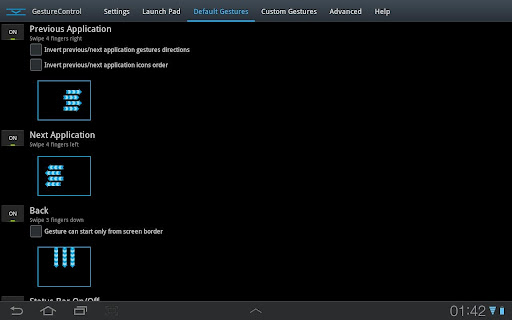
Control device with MULTITOUCH and MULTITASK gestures similar to iPad. Works in all applications. You can even hide status bar and enjoy full screen in your favorite games or while browsing.
★ Try Lite version before you buy
★ Requires root access
★ USB Debuging must be enabled in Android setting
★ Requires root access
★ USB Debuging must be enabled in Android setting
★ Multitouch
★ Multitask – start any application, shortcut or custom action without leaving current application
★ Custom actions – LaunchPad, Start application, Previous Application, Next application, Home, Kill current application, Back, Forward, Recent application list, Recent application dialog, Menu, Notification Panel, Hide/Show status bar, Start launcher shorcut(bookmark, contacts, settings, etc), Start Tasker task, Pause gestures, Exit, Screen Off (lock), Alt+Tab, Music Play/Next/Previous, Volume, Search, Voice Search, Select Input Method.
★ Swipe 4 fingers right – open previous application
★ Swipe 4 fingers left – open next application
★ Expand 4 fingers – LaunchPad (similar to SwypePad, start any application, shortcut or custom action)
★ Pinch 4 fingers – Home gesture
★ Swipe 3 fingers down – Back gesture
★ Swipe 3 fingers up – Bottom recent applications bar
★ Swipe 4 fingers up – Hide/Show status bar (experimental)
★ Custom gestures – create your own gestures to start any application, shortcut or custom action
★ Multitask – start any application, shortcut or custom action without leaving current application
★ Custom actions – LaunchPad, Start application, Previous Application, Next application, Home, Kill current application, Back, Forward, Recent application list, Recent application dialog, Menu, Notification Panel, Hide/Show status bar, Start launcher shorcut(bookmark, contacts, settings, etc), Start Tasker task, Pause gestures, Exit, Screen Off (lock), Alt+Tab, Music Play/Next/Previous, Volume, Search, Voice Search, Select Input Method.
★ Swipe 4 fingers right – open previous application
★ Swipe 4 fingers left – open next application
★ Expand 4 fingers – LaunchPad (similar to SwypePad, start any application, shortcut or custom action)
★ Pinch 4 fingers – Home gesture
★ Swipe 3 fingers down – Back gesture
★ Swipe 3 fingers up – Bottom recent applications bar
★ Swipe 4 fingers up – Hide/Show status bar (experimental)
★ Custom gestures – create your own gestures to start any application, shortcut or custom action
THERE IS NO WAY TO ANSWER MARKET COMMENTS OR CONTACT COMMENTATOR – EMAIL ME IF YOU WANT ANSWER.
Please don’t post your problems in market, email me or go post to XDA, thanks:
http://forum.xda-developers.com/show….php?t=1535740
Please don’t post your problems in market, email me or go post to XDA, thanks:
http://forum.xda-developers.com/show….php?t=1535740
If your device is listed as unsupported, please try default parsers:
1) Start application
2) Open Advanced tab
3) Is multitouch device detected properly? If not, enable ‘Override multitouch device detection’ and select your multitouch device.
4) Enable ‘Override touch events parser detection’. Select HC_DEFAULT. Click ‘Restart service’, wait a few seconds, try if it is working.
5) If it is not working with HC_DEFAULT, try ICS_DEFAULT. Don’t forget to restart service again.
6) If you make it work, please go to Help tab, click List devices and send me screenshot. Tell me that it is working with these settings. I will update application so it is detected properly in next version.
7) If it still do not work, contact me by email: goodMoodDroid@gmail.com
1) Start application
2) Open Advanced tab
3) Is multitouch device detected properly? If not, enable ‘Override multitouch device detection’ and select your multitouch device.
4) Enable ‘Override touch events parser detection’. Select HC_DEFAULT. Click ‘Restart service’, wait a few seconds, try if it is working.
5) If it is not working with HC_DEFAULT, try ICS_DEFAULT. Don’t forget to restart service again.
6) If you make it work, please go to Help tab, click List devices and send me screenshot. Tell me that it is working with these settings. I will update application so it is detected properly in next version.
7) If it still do not work, contact me by email: goodMoodDroid@gmail.com
Known issues:
- On ICS hiding bar will reset your wallpaper to default.
Live wallpapers don’t have issues. You can use “simple image wallpaper” from market to solve this problem.
- On ICS hidden bar might reapear on some ROMs
- There is no issues on Honeycomb.
- On ICS hiding bar will reset your wallpaper to default.
Live wallpapers don’t have issues. You can use “simple image wallpaper” from market to solve this problem.
- On ICS hidden bar might reapear on some ROMs
- There is no issues on Honeycomb.
Description: This application allows you to control tablet with gestures.
Swipe 4 fingers up to hide status bar. Do same gesture again to restore bar.
Swipe 4 fingers right to open previous application.
Swipe 4 fingers left to open next application.
Pinch with 4 fingers anywhere on screen to return to home screen from any application.
Swipe 3 fingers down to execute back action in any application.
Swipe 3 fingers up to show custom bottom bar with recent applications.
Expand 4 fingers anywhere on screen to open LaunchPad dialog. It is similar to SwypePad and allows start your most often used applications, shortcuts or custom actions anywhere anytime with simple gesture.
Works in all applications, games and browsers.
Application will use freed space when you hide status bar. Some games even work better with status bar hidden.
There is an option to switch to single touch gestures if its more convenient. You can even create your own gestures for any action.
Swipe 4 fingers up to hide status bar. Do same gesture again to restore bar.
Swipe 4 fingers right to open previous application.
Swipe 4 fingers left to open next application.
Pinch with 4 fingers anywhere on screen to return to home screen from any application.
Swipe 3 fingers down to execute back action in any application.
Swipe 3 fingers up to show custom bottom bar with recent applications.
Expand 4 fingers anywhere on screen to open LaunchPad dialog. It is similar to SwypePad and allows start your most often used applications, shortcuts or custom actions anywhere anytime with simple gesture.
Works in all applications, games and browsers.
Application will use freed space when you hide status bar. Some games even work better with status bar hidden.
There is an option to switch to single touch gestures if its more convenient. You can even create your own gestures for any action.
Full version adds following features: option to hide notification icon, custom gestures and special actions, any number of actions in LaunchPad.
Tags: Hide bar, gesture, gestures, gesture control, gesturecontrol,
status bar, system bar, full screen, Honeybar, ICS, SwypePad, iPad, GMD,
G.M.D.
This app has no advertisements
More Info:
Code: